Thursday, January 14, 2010

Coupa Café now at Meyer


A fancy automagic espresso machine has made its first appearance inside of Meyer 1st Floor. You can now get nearly unlimited cups of your favorite piping hot espresso, decaf espresso, americano, cappuchino, hot chocolate, café mocha, or café latte. Coupa Café certifies that it is full of organic and free-trade goodness as well.


All you have to do to get started is dig in your wallet to find a card with certain symbols on it that say things like "VISA", "MC", "Discover", or "AMEX." Just one swipe, and PRESTO! Coffee comes to the rescue, whether you need a pick-me-up after class or it's 4 in the morning. Further instructions are posted on the machine. And just in case you make a big mess, the machine is conveniently located right next to the bathrooms. In fact, the nook in the wall almost makes it seem like it was always meant to be there. Actually, wait, didn't there used to be a water fountain there?

Inside the belly of the beast
Machine out of caffeine juice or ate your credit card? Call 650-200-3113 for problems.

Let us know what you think about the new expresso machine!

Wednesday, September 16, 2009

New School Year, New Equipment

Happy New Academic Year at Stanford! Many of our faithful readers may already be aware of the impressive inventory of equipment available for checkout at the Meyer Tech Desk. We've gone ahead and added some additional gadgets to our collection just in time for the new year. Check them out!


Dell m409wx DLP Projectors are always popular for presentations and movie/gaming events. Accepts video input from VGA, HDMI, S-Video, and Composite (RCA) video. Comes with a VGA cable and convenient carrying case.


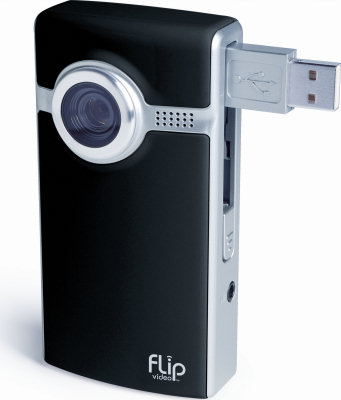
Flip Ultra HD camcorders fit conveniently in your pocket and record 60 minutes of 720p HD video. Use the built-in USB plug to connect it to your computer and it will be detected as an external hard drive containing videos encoded using the H.264 codec.


Canon Vixia HF20 HD camcorders store full HD video in either the built-in 32GB flash memory or on SDHC cards (not included). Use USB to connect it to your computer and it will be detected as an external hard drive containing videos encoded using the AVCHD codec. (Note: Standard hot-shoe mounted mics like the Rode Shotgun mic will not fit on its Mini Advanced Accessory Shoe.)


Rode Shotgun microphones are a professional choice for getting high quality audio. Hook them up to camcorders with an accessory hot shoe for best results. (Currently,
they work best with our Canon HV30 HD camcorders.)


Proline tripods are high-quality units for keeping your shots steady. We recommend using a tripod whenever possible to improve your videos unless you're trying to simulate an earthquake.


LG DVD Burners are perfect for people who have Netbooks or MacBook Airs who need to read or write CDs and DVDs. (Note: Burners will most likely not play a video DVD without a software DVD player installed on your computer.)


Sony MP3 Recorders can store over 11 hours of recorded audio in MP3 format. They also have a mic-in port for optimal recording quality.


Iomega 320GB USB hard drives are almost small enough to fit in your pocket, and they fit a ton of stuff! Use it to store a big project short term or backup your computer's contents before doing a system restore. (Note: USB hard drives cannot be used for editing iMovie 09 projects.)


Finally, we suspect hordes of patrons will crowd their way into Meyer for a chance to check out the awesome Creative Extigy SB0130 External USB Sound Card. This amazing feat of engineering crams the following features into one slick little package: High Signal-to-Noise Ratio (SNR) exceeding 100dB using high linearity, low distortion 24-bit converters with resolutions of up to 96kHz. Digital-to-Analog Converter (DAC) for 6-channel analog speaker & headphone output. Supports Sony/Philips Digital Interface (SPDIF) format input signal. Hardware Digital Signal Processor (DSP) for precise sampling rate conversion, Creative Multi-Speaker Surround (CMSS), 3D audio algorithm processing, digital mixing or bass management; as well as accurate Dolby Digital processing. Total Harmonic Distortion + Noise at 1kHz (A-Weighted) = 0.006%. All we can say is, "Wow."

As usual, loans of all items are free for the first overnight checkout period, and then a $10/item/day rental fee or $15/item/day late fee after that. For more info, see our Equipment Checkout policies.

Thursday, May 28, 2009

The Week in Review 5/21 - 5/27

Meyer Tech Desk News

Need a Group Study Space? Then Area 220 is the place to be!

After having been blocked off for several weeks, Area 220 is now back in commission. New features include round tables, chairs, nifty futuristic-looking furniture, and floor-to-above-your-head whiteboard walls. That's right, you can write on the walls! There are markers and microfiber cloths available for use in conjunction with the whiteboard. Area 220 has also been designated as a group study space, so the buzz of intelligent conversation is expected and welcomed. Consequently, if you are looking for a quiet niche, this is probably not the best place to go. Like most services in Meyer, Area 220 is available on a first-come, first-serve, and reservations are not available.

Please email any comments or suggestions to studyspaces(@)rescomp(.)stanford(.)edu.

Yes, you can write on the walls!

Funky modernist industrial furniture.

(He's doing it wrong...)

The Week in Review (5/21 - 5/27)

Busiest Day
Wednesday - 27%
Tuesday - 27%
Thursday - 20%

Busiest Shift
3 - 4 PM - 10%
1 - 2 PM - 10%
2- 3 PM - 10%

"Busiest" Consultant
Peter - 27%
Shannon - 12%
Tim - 7 %

Consultants, this is shameful. No single consultant should be responsible for nearly a third of all logs during the week. Log your interactions!

Most Frequent Interaction
Equipment Checkout - 51%

Interactions of the Week
5/21
Rockstar consultant Peter updated the Apple video adapter display to include the new generation and flavors of Macbooks.

5/21
my rcc can't fix my internet.
how old is the laptop? new
what are you running? vista
well there's your problem.
(the broadcast flag needed to be set to 1. the rcc in question will receive ninety verbal lashes and a raised disapproving eyebrow)

Friday, February 13, 2009

Happy 100th Post! And Happy Valentine's Day! And Happy 1234567890 Day!

Just when Stanford was getting settled into this California weather groove, you know, when it NEVER rains, the clouds rush in on the heels of a cold and wet front, leaving the turf rather squishy and tattooing bikers, bumper-less or not, with rather unfortunate mud stripes. But no matter. Tomorrow is Valentine's Day! Despite numerous face-lifts and renovations, Green and Meyer Libraries have been eyeing each other for years and finally have the courage this year to swap Valentines!


Through the cumulative efforts of a long lineage of faithful Meyer Tech Desk bloggers, we have reached one hundred posts! W00t! And for one last geek plug, today is 1234567890 Day! Unix time reached the landmark time of 1234567890 seconds, which is the number of seconds since January 1, 1970.

(Screenshot courtesy of Wito)

And now for the Week in Review.

Busiest Day

Wednesday - 23%
Saturday - 19%
Tuesday - 18%

Busiest Shift
2 - 3 PM - 11%
6 - 7 PM - 10%
1 - 2 PM - 8%

"Busiest" Consultants
Yin - 10%
Shannon - 9 %
WillA - 8%

Last Month's Top Logger
WillA - 10% of all of January's posts
Most Frequent Interaction
Equipment Check-Out - 48%

Interactions of the Week

Feb 7
Emily
7:20 PM: Patron: I just checked out this camcorder, and I can't get it to work
Emily: Apparently, you are missing a tape.
7:30 PM Sold: two mini dv tapes

Feb 11
WillA
11:00 AM - I learned to cut things, particularly posters!
Michael
10:20 PM - i'm still here but not much is happening.
[This post was followed by a sudden flurry of activity. Be careful what you wish for]

Friday, September 26, 2008

And So the School Year Begins . . .

The Meyer Tech Desk is proud to offer our users an array of new services and equipment under our new checkout program for the school year.

The Tech Desk's Hottest New Toys


Projectors - We have Dell m409WX projectors for equipment checkout. They may be small and cute, but they pack a lot of punch too! Each projector comes with an AC power adapter and a VGA cable in a nifty carrying bag. These projectors also have an HDMI port and project in beautiful widescreen. Suitable for class presentations and dorm movie nights!


High-
Definition Camcorders - We now stock Canon Vixia HV30 Camcorders which will record in stunning 1080i HD resolution (1920 x 1080 pixels). These are not for the faint of heart! With great quality comes great storage-eating capabilities. A project recorded in HD will take up four times as much disk space as regular DV footage, so beware. (One hour of HD footage will take about 50GB of space.) Most users only need our normal camcorders, so you must ask specifically for HD if you need it.

And finally, after Kenneth demonstrated this cute little device over a year ago. . .

Mini-Camcorders - We have Flip Video Ultra VGA Camcorders. They record at VGA resolution (640 x 480 pixels), as compared with the 720x480 resolution you get with the standard miniDV camcorders we offer. However, These Flips are pocket-sized and can be directly plugged into the USB port of any computer for file transfer! How cool is that? Ask us for a demo.


The New Deal: The Meyer Tech Desk Checkout Policies 2008


Ever needed a camcorder for more than a day, but had to turn it in because of the one-day only checkout policy? We now offer Extended Checkouts!

Anything you checkout normally from the Tech Desk is still due back by closing time of the next business day. However, now if you want to rent it for longer, you can pay up front for an Extended Checkout. It's $10/day for each piece of equipment you need beyond the initial free day, so plan carefully! Overdues will be result in a $15 fee per day per item.

Example: Qianwen wants to checkout a Flip Video Camcorder for her ski trip to Lake Tahoe. She checks out the camcorder on Friday morning, and won't be back on campus until Monday. She gets one free day (Friday to Saturday) and then pays $20 up front for Sunday and Monday. If she did not pay for an Extended Checkout, she would be fined $15 per overdue day, resulting in $30 of fines by the time she returns the equipment.

Next week, we'll be introducing some new faces at the Meyer Tech Desk. Stay tuned!

Friday, May 16, 2008

Why is everything crashing?!

Every so often it happens that a visibly flustered patron comes up to desk and complains that the cluster Mac she's been using is extremely slow and programs are crashing on it left, right and center. In nine out of ten cases, this is because said patron's AFS space, i.e., the meager 200 megabytes of online storage Stanford provides to students (in 2008!), is full, which usually causes Macs to go completely haywire. So, if your Mac is going haywire because your AFS is full and you want to find out how to clean it up to recover space, follow the instructions below.

The Finder Way
The first step is to log on to a Mac, open a Finder window and click on your home folder in the sidebar (unless you're already there). Most Macs open Finder windows in Icon View by default and you will need to switch to Column View, either by using the keyboard shortcut Command-2 or by clicking the icon in the toolbar, in order to see where all the space is being taken up. After doing that, the Finder window should look something like this:

Of course, the problem here is that, since everything is a folder, all the file sizes come up as "--", so we still don't know where all the space is going! This is easily remedied by selecting Show View Options from the View menu and checking the "Calculate all sizes" box. Finder should now start calculating the size for each folder one by one. The last thing to do would be to sort the list by the Size column by clicking on it, so that you can quickly locate the culprit taking up the most space, like this:

Also, if you want to see what files within a certain folder are taking up the most space, instead of double-clicking on the folder, click on the arrow to the left of its name, which will open it up within the same view, like this:


The Terminal Way
As it turns out for a lot of tasks, there is often a faster way to do something if you use the command-line, so if you're comfortable using the Terminal on the Mac or SecureCRT on Windows, here's a command that lists all the files and folders inside the current folder with their total sizes: du -hs *

Using the du command, the output looks something like this on the same home folder you saw in examples above:


And just a quick reminder - checking AFS space on Macs is simple with Joe's App. Alternatively just open terminal and type in "fs lq."

Happy Spring Cleaning!

Tuesday, November 13, 2007

Week in Review, Nov 6 - 13

Have you ever lost an important data file? A hard drive full of them? Then pay attention to this week's blog...

Backing It Up!
A Quick Guide to Backing Up Your Own Hard Drive


Memory is getting increasingly cheap so users are left with fewer and fewer excuses not to back up their important files (if not their entire hard drives).

Macs

- If you upgrade to Leopard, simply enable Time Machine to regularly backup your files

- For earlier versions of OS X, this website provides some step by step information as well as suggesting alternate backup programs. However, if you don't want to worry about missing a few random files with backup, investing in Leopard and having a complete record of your data might be worthwhile.


PCs

- For Windows XP, this website provides a pretty good walk-through of how to back-up both manually and automatically. Automatically is often more oriented towards stationary desktops permanently attached to external drives -- but can still be used with laptops. I'd also amend that 40gb external hard drives are no longer that big (it's hard to even buy one that small). In the unfortunate even that you've lost your Windows CD, manual back-up or using another program are probably your best alternatives.

- For Windows Vista, this official website seems to follow a similar walk-through patten for using automatic back-up.

A few general notes...

- Try to keep organized files so you know that you are actually backing up all your data. ESPECIALLY if you do it manually -- you don't want to find out that the one file you actually needed was in another folder.


As for data loss stories, have any consultants lost data in an interesting way? Laptop stolen? Computer suffered water damage? Strong magnets? To start us off, I lost a good bit of data off a hard drive in high school when the family computer refused to turn on one morning. That day, my mom was on the phone with tech support and a small fire actually started in our computer.

Consultant-Client Interactions (Nov 6 – Nov 13):

Total Interactions: 513

Top Categories:

Equipment Checkouts: 219
Directions and Info: 71
Printer Issue/Refill: 46

Nov 7, 4:20pm Do you rent projectors?
Note: Since this gets asked a lot, I thought I'd elaborate a bit on our typical "nope" response. While Meyer does not provide services for renting projectors there are several places that do. RCCs have access to them through rescomp, residential staffs have access to them through their residential offices, and departments have their own as well. If all these resources fail, there is Stanford Event Services. While starting at $150 for two hours is far from cheap, it's good to keep in mind if all other alternatives fail.

Nov 13, 2:50pm Looking up Meyer Items Online
Note: If you want to see what we check out, you can simply check out our wiki, if you want to see what's in that's slightly more complicated. While you can search for availability status using Socrates, it's not something I would typically recommend. For example, searching "Camcorder" gives you Meyer's typical mini-DV camcorder as the ninth hit. Click on the entry and note that it lists 10 camcorders, one of which was due last spring. At the moment it claims 4 camcorders are on the shelves but none actually are there. Unfortunately, the only sure-fire way to figure out availability is to come in.